Guides › Images and graphics
How to create a QR code and export PNG or SVG
Last updated 10 October 2026 · Written by Souren Das
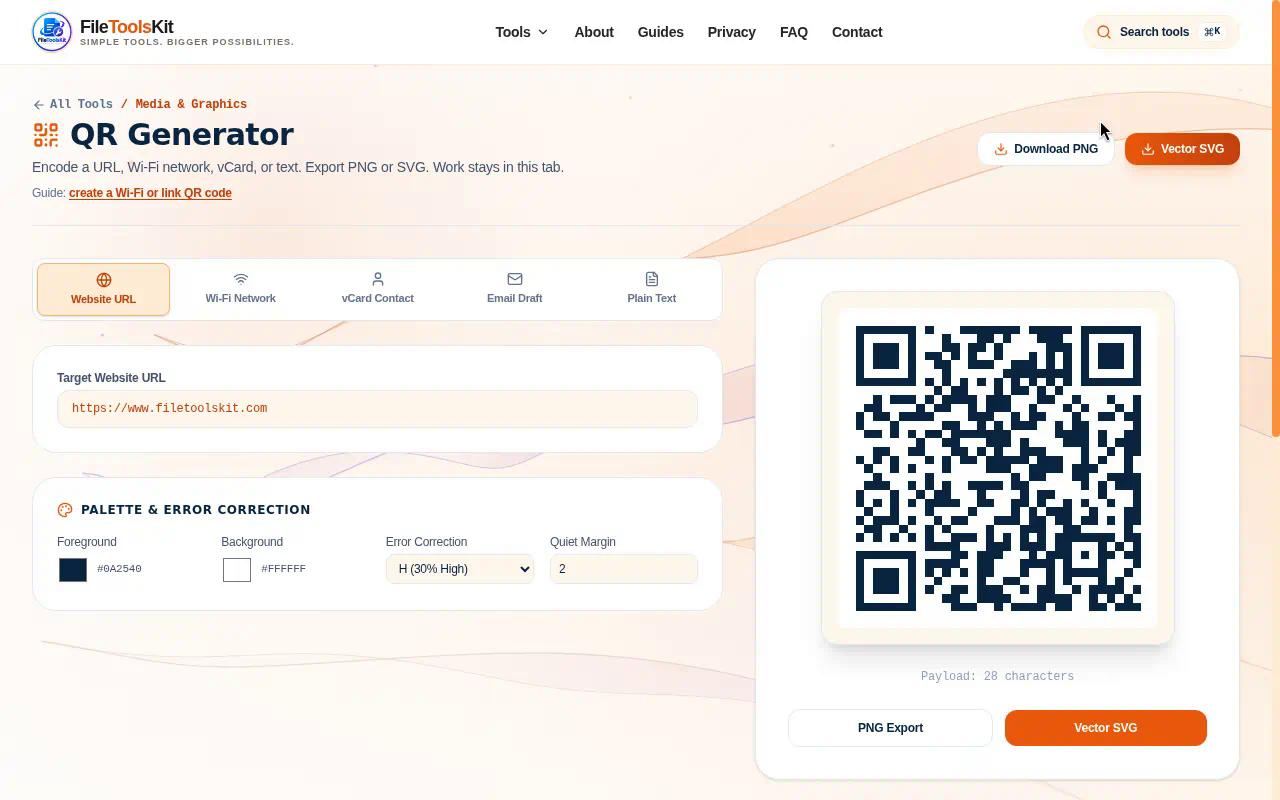
QR Generator encodes a link, Wi-Fi details, a contact card, an email address, or a short line of text, and exports PNG or SVG. The code is drawn in this tab. FileTools Kit does not host a redirect behind it and does not count scans. The code points at exactly what you typed, nothing else, which also means it keeps working as long as that address works.
Static codes versus "dynamic" codes
Many QR sites create a short link on their own server and put that in the code, so they can count scans and let you change the destination later. The catch is that the code only works while their service and your subscription last. The codes made here are static: the destination is written into the pattern itself. Nothing can be changed after printing, and nothing stops working because a company closed an account. For a menu, a business card, a poster, or a Wi-Fi card, static is usually what you want.
Steps
- Open QR Generator.
- Pick a type at the top: Website URL, Wi-Fi Network, vCard Contact, Email Draft, or Plain Text. The fields start with example values, so replace them all.
- Fill the fields. For a link, paste the full address. If you leave off https://, the tool adds it.
- Under Palette & Error Correction, keep a dark Foreground on a light Background, leave Error Correction on H for print, and keep Quiet Margin at 2 or more.
- Press Vector SVG for print or Download PNG for a slide or a chat. The files are named filetoolskit-qr.svg and filetoolskit-qr.png.
- Scan the exported file with your own phone, and with a second phone if you can, before you print a stack.
What each type puts in the code
A URL is stored as typed. Wi-Fi stores the network name, the password, and the security type in the format phone cameras read, so the phone offers to join the network; characters such as a semicolon, comma, colon, backslash, or quote are escaped as that format requires. The Wi-Fi QR guide covers that type in detail. A vCard stores a name, phone number, email, and organisation, and the phone offers to save the contact. Email Draft stores a mailto link with the email address and the subject Contact, so the phone opens a new message. Plain Text stores the words and nothing else.
Error correction, colours, and margin
Error correction decides how much of the code can be damaged and still scan: about 7% at L, 15% at M, 25% at Q, and 30% at H. H is the default and suits print, where a fold or a smudge is likely. Higher levels make a denser pattern, so for a long payload on a small sticker, M can scan better. Keep a dark foreground on a light background; inverted or low-contrast colours fail on some scanners. Quiet Margin runs from 0 to 6 modules. Leave it at 2 or more, because scanners need that empty border to find the code.
Print size
The PNG export is 320 pixels wide. That is fine on a screen or a slide, but it will look soft if you blow it up for a poster. The SVG is a vector file that stays sharp at any size, so send the SVG to a print shop or place it in your design tool. A common rule of thumb is that a code should be at least about 2 cm across for a business card scanned at arm's length, and larger for anything read from a distance: roughly one-tenth of the scanning distance. Test a printed proof before ordering hundreds.
Common mistakes and fixes
- The code opens the example site. The URL field still had its starting value. Replace every example value before exporting.
- The code will not scan. Check contrast, margin, and size. A very long URL makes a dense pattern; use a shorter address if you control it.
- A logo pasted on top broke it. This tool does not add logos. If you add one in a design tool, keep it small, keep Error Correction on H, and test again.
- The link changed after printing. A static code cannot be updated. Point it at a page you control and will keep.
- Colours inverted for style. Light-on-dark codes fail on some phones. Stick to dark on light.
Privacy
The code is generated in this tab with the qrcode library. What you type, including a Wi-Fi password, is not sent to a FileTools Kit server, and there is no tracking redirect. Anyone who scans the code sees the contents, so treat a printed Wi-Fi code like a written password. See what stays in the tab.
FAQ
Do these QR codes expire?
No. The content is in the pattern. It works as long as the link or network it points to exists.
Can I see how many people scanned it?
No. There is no tracking. If you need counts, use a link with campaign parameters on your own site and check your own analytics.
Can I change the colours?
Yes, with Foreground and Background. Keep strong contrast.
Is SVG or PNG better?
SVG for print and design tools, PNG for screens and messaging apps.
Related guides: make a Wi-Fi QR code, SVG vs PNG, JPG, PNG, or WebP.
Written by Souren Das, FileTools Kit, Bengaluru. Last updated 10 October 2026. Spotted a mistake or a step that does not match the tool? Email support@filetoolskit.com and I will fix it. See how tools and guides are tested.